Upstore Free vs Premium: Real Speed Tests, 24-Min Wait & Limits (2026)
To see how much difference an upgrade actually makes, we tested an Upstore Free account and an Upstore Premium account side by side on the same connection, the same day, using both Chrome and JDownloader 2. Below are the exact numbers and screenshots—no marketing estimates.
Free vs Premium: Test Results at a Glance
| Metric | Upstore Free | Upstore Premium |
|---|---|---|
| Pre-download wait | 28–37s countdown + hCaptcha | None (instant start) |
| 83.17 MB RAR (UI estimate) | ~18 minutes | ~17 seconds |
| 361.73 MB MP4 (UI estimate) | ~1 hour | ~1 minute |
| Single-file browser speed | 68.5 KB/s (858 MB ≈ 4 hours) | 11.5 MB/s (362 MB ≈ 30 seconds) |
| 3 parallel files in Chrome | Blocked (1 active download max) | ~21.8 MB/s combined (8.7 + 6.9 + 6.2 MB/s) |
| 4-file batch in JDownloader 2 | Blocked by captcha & IP cooldown | 46.24 MiB/s average (39.95 MiB/s sustained) |
| Wait between files | 24-minute IP cooldown | None |
| Resume support | No (restarts from 0%) | Yes (Chrome & JDownloader 2) |
Upstore Free Limits in Real Use
Upstore’s free tier isn’t just slower—it stacks four separate limits on every download. For one small file they’re manageable; for a large file or multi-part archive, they bring everything to a crawl.
1. Countdown Timer & Mandatory hCaptcha
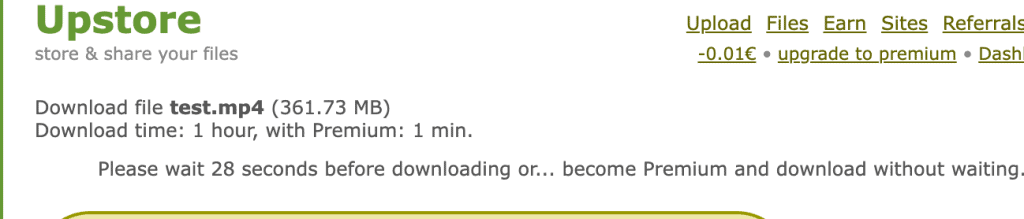
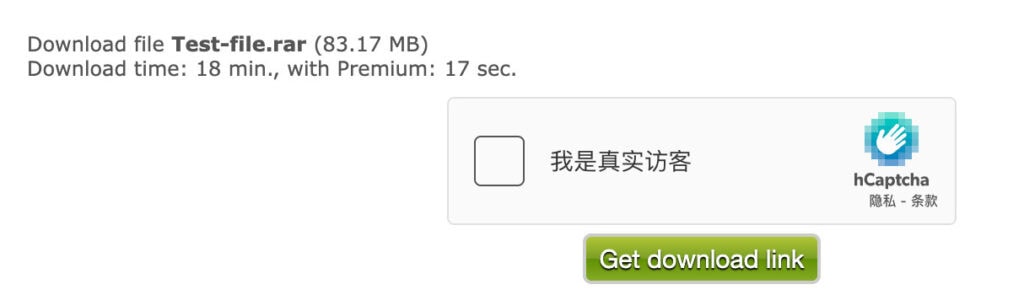
Every free link starts with a 28–37 second countdown followed by an hCaptcha check. If you switch tabs or let the page sit too long, the token expires and you start over. Because every link requires manual input, unattended download queues in JDownloader 2 simply don’t work on a free account.
2. Hard ~68.5 KB/s Speed Throttle
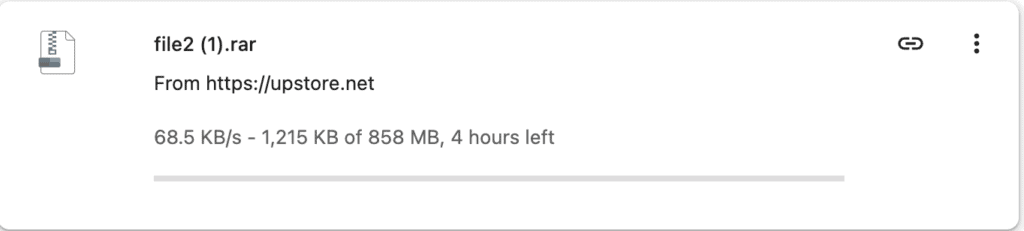
In our Chrome test on an 858 MB RAR file, free speed settled at 68.5 KB/s—leaving about four hours on the clock. Worse, free downloads don’t support resume: if your Wi-Fi blips at 80%, the transfer fails and restarts from zero.
3. 24-Minute IP Cooldown Between Files
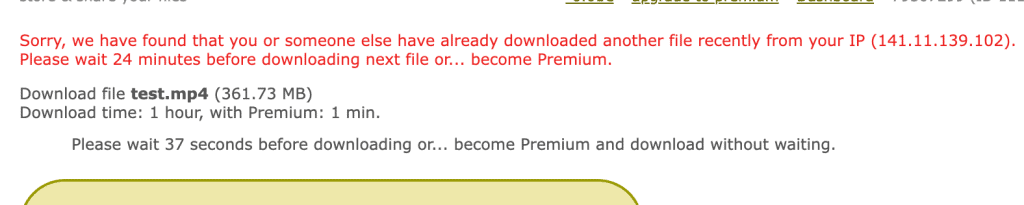
Once a single free download completes, Upstore blocks your IP for 24 minutes. On a 10-part RAR archive, that adds nearly four hours of pure dead waiting time on top of the slow transfer itself.
Premium Speed Benchmarks in Chrome
Switching to a Premium account on the exact same browser and connection removed all timers, captchas, and cooldowns immediately.
Single-File Test: 11.5 MB/s
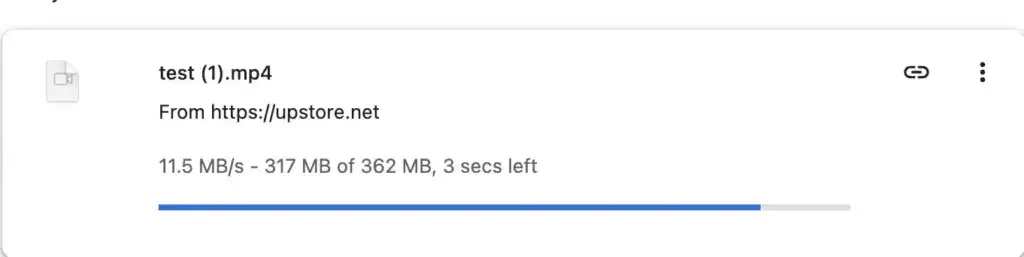
A 362 MB file downloaded at a steady 11.5 MB/s—roughly 170x faster than the 68.5 KB/s free cap—and finished in about 30 seconds.
Three Parallel Files: 21.8 MB/s Combined
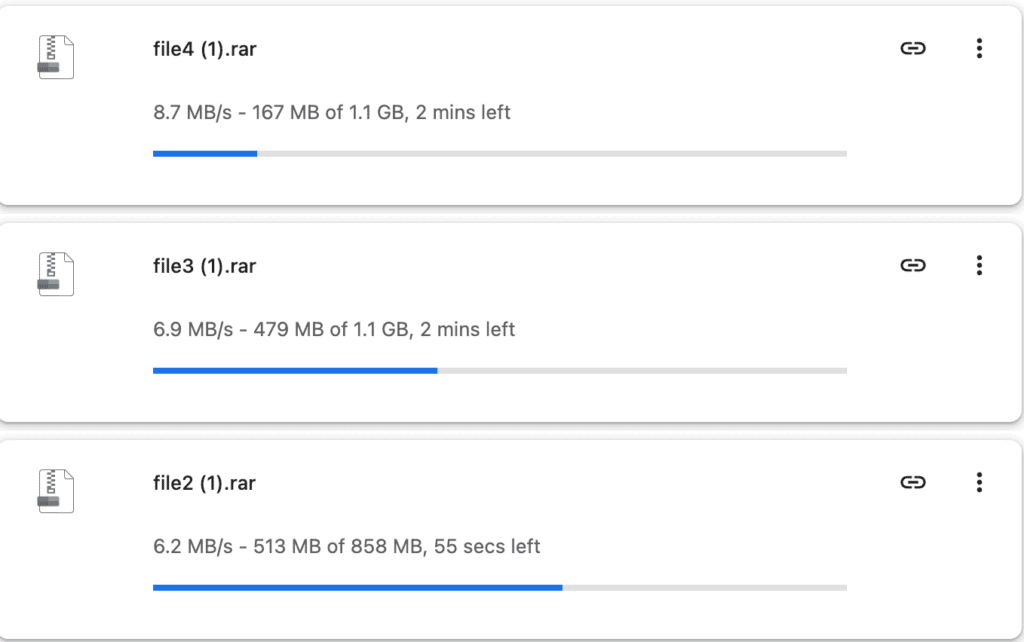
Single browser connections usually plateau around 8–12 MB/s due to single-stream TCP limits and per-node routing. Running three downloads at once in Chrome pushed combined throughput to 21.8 MB/s with zero queue errors.
JDownloader 2 Batch Benchmark: 46.24 MiB/s

For multi-file queues, JDownloader 2 is where Premium really shines. With four simultaneous downloads active, JDownloader 2 held 39.95 MiB/s sustained and averaged 46.24 MiB/s—handling retries, resume, and RAR extraction automatically. If you run into plugin or login issues in JD2, see our JDownloader 2 troubleshooting guide.
Bottom Line: Stay Free or Upgrade?
- Stay on Free if: you only need one small file (under ~50 MB) or just want to check whether a link is still online.
- Upgrade to Premium if: you’re downloading large files (300 MB+), multi-part RAR archives, or any batch of links in JDownloader 2.
Because free throttling is enforced server-side, local tweaks won’t bypass it (see our slow download fix guide for what can and can’t be fixed locally). For current durations and daily costs starting at €16, check our Upstore Premium pricing overview.
Affiliate Disclosure: Upstore.org is an independent guide and is not affiliated with Upstore.net. Some links on this page are affiliate links; we may earn a commission on qualifying purchases at no extra cost to you.